
Setting up your shipping options correctly ensures a smooth experience for both you and your customers. We have a number of shipping options available on Crafter’s Market UK and this guide will help you through it!
So what are the options?
Crafter’s Market UK offers the following shipping options:
- Zone/Class Shipping: This allows you to set a flat rate based on broad package size. If you require more specific options, consider the Per Product Shipping method below.
- Free Shipping: Offer free shipping on all items or orders above a certain amount.
- Local Pick Up: Offer the options for customers who are local to collect items at a set price/free.
- Per Product Shipping: This option is integrated within each product listing and allows for more detailed shipping rules. For example, you can set a base cost (e.g., £2) and an additional charge per extra item (e.g., 50p per item).
Unfortunately, with a growing vendor population, it is exceedingly difficult to offer shipping options that are perfectly suited to every business—but thankfully, most vendors use their creativity to make the available options work for them. Hopefully, you’ll be able to find a solution that fits your needs too!
Zone Shipping, Free Shipping & Local Pick Up
These options are all set up via Store Shipping!
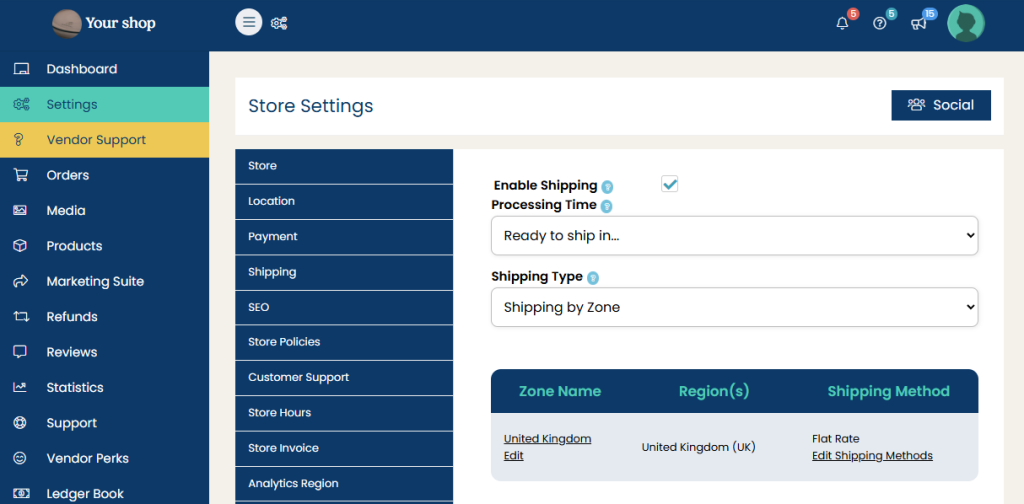
Access Your Shipping Settings
- Log in to your Crafter’s Market UK account.
- Click on Dashboard in the top navigation menu.
- Select Settings from the left-hand menu.
- Click on Shipping to access your shipping preferences.
Free Shipping & Local Pick Up
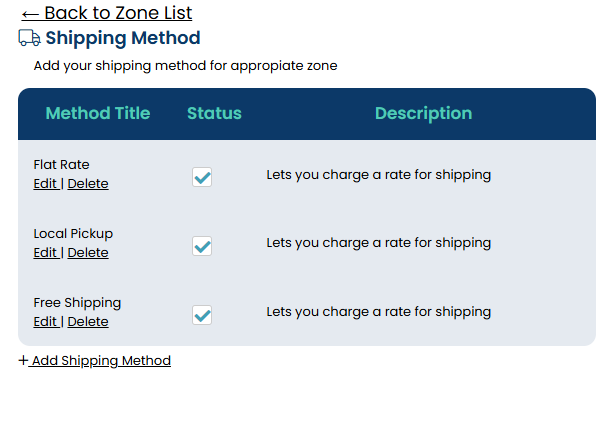
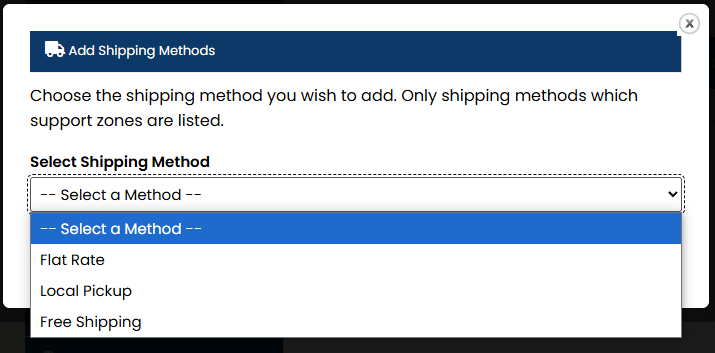
Click ‘Add Shipping Method’ to add Local Pick Up or Free Shipping Options and then ‘Edit’ to alter any prices necessary. If you want to add Free Shipping over a certain amount this can be done when editing Free Shipping.
Set Up Shipping Zones
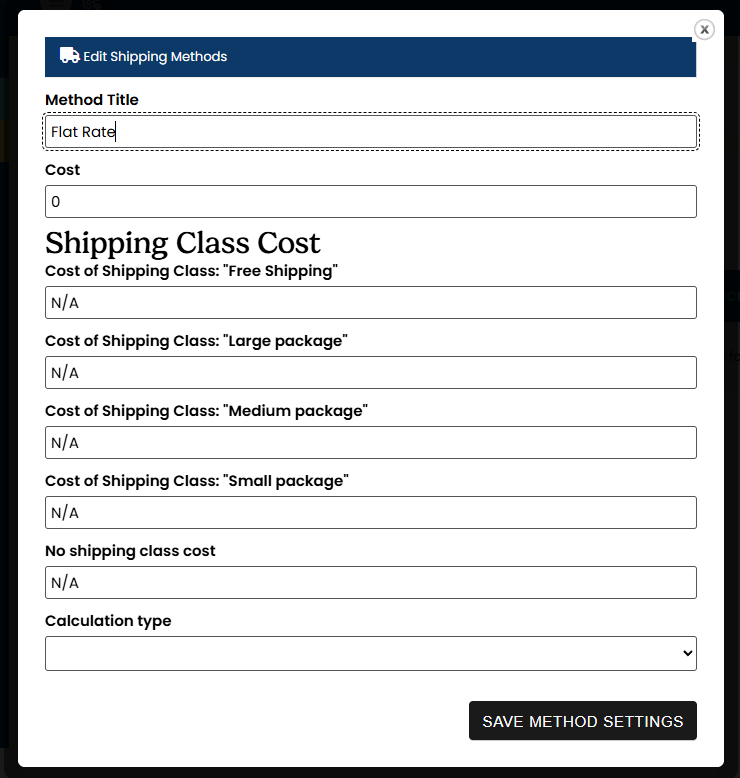
Shipping by Zones is our Flat Rate shipping option which also allows you to set shipping prices for various parcel sizes if one price doesn’t fit all.
- ‘Edit’ your Flat Rate Method
- Insert your prices. Choose to enter a standard ‘Cost’ that will be store wide, or you can choose to have various prices to various package sizes.
- Under Calculation Type, decide whether to charge customers once per basket or per individual item.
- Click Save Changes.
Per Product Shipping
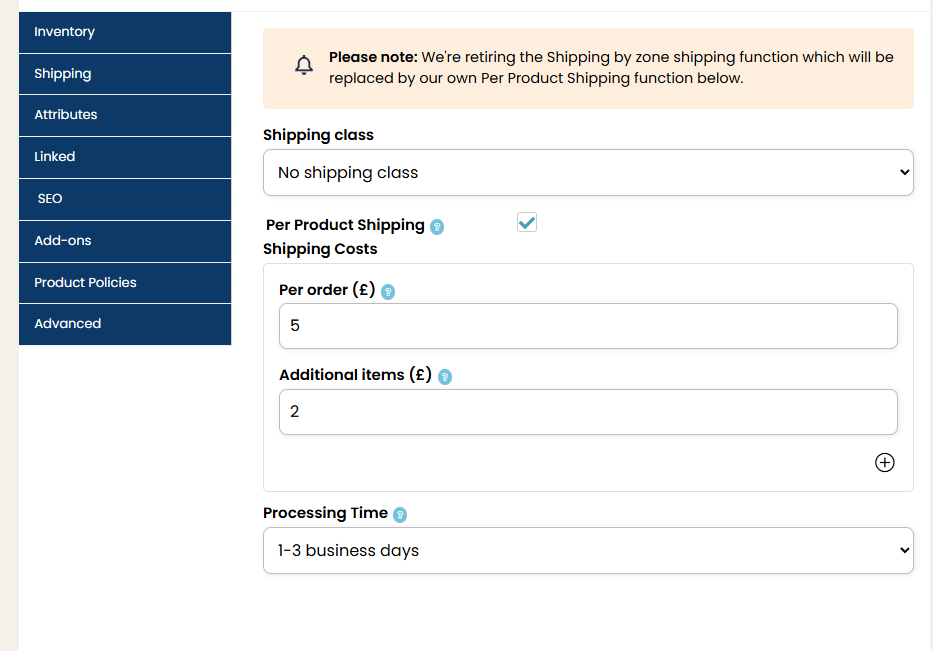
If you require more specific shipping rules (e.g., £2 plus 50p per additional item), you can set shipping parameters within individual product listings:
- When adding or editing a product, locate the Shipping section.
- Enable Per Product Shipping.
- Set your base cost and additional item pricing.
- Save your product listing.
Configure Processing Times
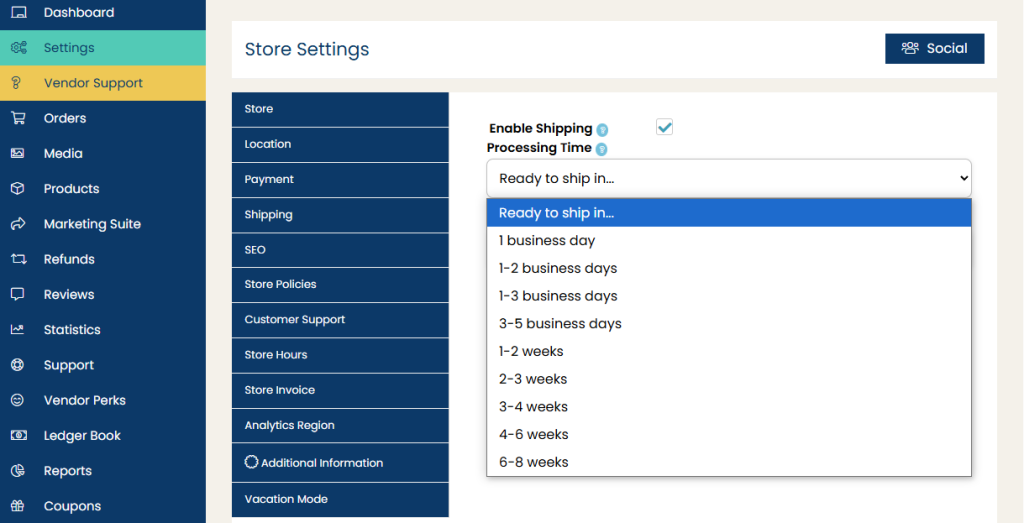
Processing time refers to how long it takes you to prepare an order before shipping. To set this up:
- Go to Shipping Settings.
- Select the default processing time (e.g., 1-3 business days, 3-5 business days, etc.).
- This information will be displayed on your product listings.
- Click Save Changes.
Step 5: Test Your Shipping Setup
To ensure your shipping settings are working correctly:
- Add one of your products to the cart.
- Go through the checkout process as a customer.
- Verify that the correct shipping options and costs appear.
If anything seems incorrect, go back to your settings and adjust accordingly.
Additional Tips
- Offer free shipping promotions to encourage larger orders.
- If you’re a plus vendor you could set up ‘Coupons’.
- Be clear about estimated delivery times in your product descriptions.
- Use tracking services for high-value items.
- Regularly review and update your shipping settings as needed.
If you need further assistance, feel free to contact Crafter’s Market UK support. Happy selling!