
As A Customer
Please see our article ‘What Should I Do If My Item Doesn’t Arrive/Is Damaged/Not As Described?’
If you’re requesting a refund because the order is mistaken or no longer needed then please Contact The Vendor
Please note that refund request are not instantaneous. When a vendor requests your refund a member of our team has to review the request, approve it and then the movement of funds can take up to 7 days before reaching the customers account.
As A Vendor
Refund requests must be done BEFORE withdrawing your funds from your account. If you do not have enough funds in your account to cover the refund you will need to deposit funds into your stripe account BEFORE putting in your refund request – See below on how to do this.
- Head to your ‘Order List’
- Locate the ‘Refund Request’ icon.
- Choose from Partial Refund Request or Full Refund Request
- Submit your request
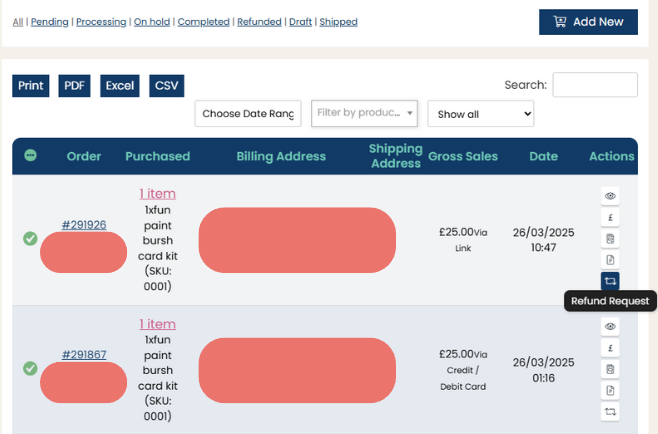
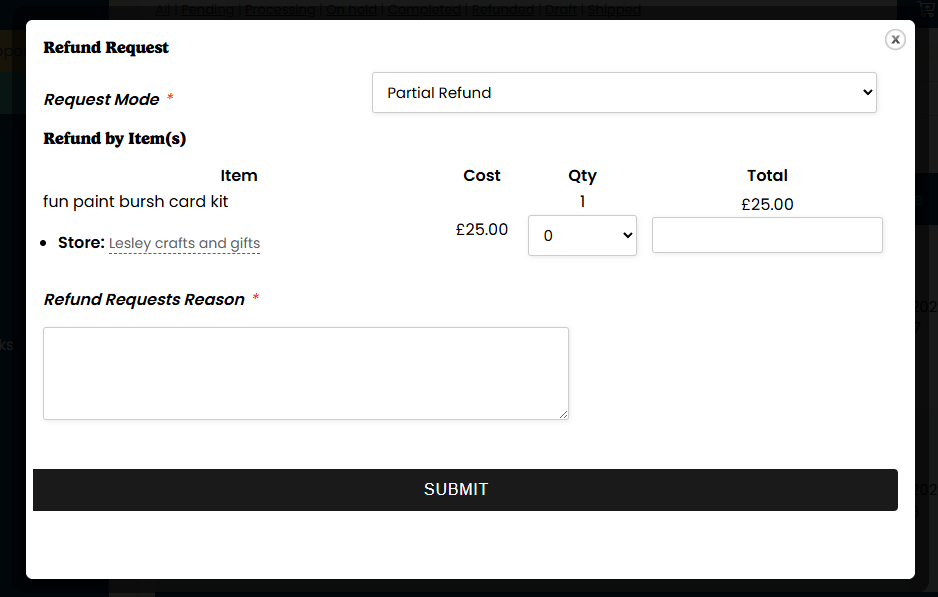
Steps to Add Funds to Stripe for Refunds
- Log in to Your Stripe Dashboard
- Go to Stripe and log in with the email and password associated with your Crafter’s Market UK Stripe account.
- Go to the ‘Balance’ Section
- In the left-hand menu, click on ‘Balance’ to see your available funds.
- Click ‘Add Funds’
- Select ‘Add to balance’ or ‘Add funds’ (the wording may vary).
- Choose ‘Payments and Refunds’ as the purpose of the funds.
- Enter the Deposit Amount
- Enter the amount you need to cover the refund.
- Make sure you add slightly more than the refund amount to cover Stripe fees if applicable.
- Choose a Payment Method
- Select your linked bank account or debit card to transfer the funds.
- Confirm and Complete the Transfer
- Follow the prompts to confirm the deposit.
- Funds may take a few hours to a few business days to appear in your Stripe balance, depending on your bank.
- Process the Refund via Crafter’s Market UK
- Once the funds are available, go back to your Crafter’s Market UK dashboard.
- Locate the order you need to refund.
- Process the refund as usual.
If you encounter any issues with adding funds, Stripe support can assist directly.